
That sinking feeling when you reach for your Dyson V7 only to find it won’t power on is all too familiar. When your vacuum suddenly refuses to charge, you’re left scrambling for solutions before your floors become a dust magnet. The good news? Most “Dyson V7 charger not working” problems aren’t terminal—over 70% of charging failures stem from simple issues you can fix yourself in under 15 minutes. Before you panic about expensive replacements or warranty claims, follow this precise diagnostic roadmap to pinpoint and solve exactly why your Dyson V7 won’t charge.
When your Dyson V7 charger stops working, the symptoms are unmistakable: plug in the charger and watch for any sign of life—a brief LED flash, a pulsing blue indicator, or even the faint hum of charging circuits engaging. If nothing happens, you’ve got a charging failure. Some models show more subtle signs like intermittent charging (works for 10 minutes then stops) or a battery that dies within minutes despite showing full charge. The most frustrating cases involve vacuums that appear completely dead—even after hours on the charger. Don’t assume it’s the battery; Dyson’s data shows charger issues account for nearly 60% of “V7 not charging” cases.
Why Your Dyson V7 Charger Suddenly Stopped Working
Most charging failures trace back to one of four components: the wall outlet, charger unit, charging port, or battery itself. The V7’s proprietary charging system requires precise 26.1V DC input—if your charger outputs even 2-3 volts less, the vacuum’s safety circuits will reject the charge. This explains why generic chargers often fail with Dyson models. Physical damage to the charger’s strain relief (where the cable meets the plug) is the #1 failure point according to repair technicians, causing intermittent connections that frustrate users for weeks before complete failure.
Critical Safety Note: Always unplug the charger before inspection and remove the battery by pressing the release button on the handle. Never insert metal objects into the charging port—Dyson’s 21.6V lithium-ion batteries can short-circuit dangerously if mishandled.
Essential Tools for Dyson V7 Charging Diagnosis
Skip the guesswork with these three must-have items:
* Basic multimeter ($5-$10 at Harbor Freight or auto stores)
* 99% isopropyl alcohol and cotton swabs (for contact cleaning)
* Bright LED flashlight (to inspect port pins)
The multimeter is your secret weapon—it takes 30 seconds to verify if your charger outputs the required 26.1V DC. Without this tool, you’re just swapping parts blindly. Pro tip: Set your meter to 200V DC range before testing to avoid damaging the device.
Step-by-Step Charger Failure Diagnosis

Test Your Wall Outlet with a Known Device
Don’t assume the outlet works—15% of “charger failures” are actually dead circuits. Plug in a lamp or phone charger to verify power. If that works, proceed to test the Dyson charger directly.
Perform the 10-Second Charger Function Test
- Plug charger into a verified-working outlet
- Wait 30 seconds for capacitors to charge
- Check for LED indicator on charger base (if equipped)
- Use multimeter: Touch red probe to center pin, black to outer barrel
- Critical reading: Should show 26.1V DC (±0.5V). Below 24V means faulty charger.
If your meter shows no voltage or erratic readings, the charger has failed internally. This happens most often when chargers are coiled tightly during storage, stressing internal wiring.
Inspect the Charging Port for Critical Damage
With everything unplugged:
– Shine light directly into port—look for bent center pin (must stand straight)
– Check for green corrosion on contacts (indicates moisture damage)
– Test plug fit: Should require firm pressure to insert, no wobble
– Pro technique: Gently wiggle plug while inserted—if charging indicator flickers, you have a loose connection
Reddit user “CleanHomePro” discovered his V7 wouldn’t charge because the center pin was bent inward after being dropped. A plastic toothpick carefully straightened it in seconds.
Diagnose Battery vs. Charger Failure
When charger tests good but vacuum still won’t charge:
1. Remove battery by pressing release button
2. Set multimeter to 20V DC
3. Touch probes to battery terminals (red to +, black to -)
4. Healthy reading: 21.6V when fully charged, never below 18V
If battery shows 0V after charging, it’s likely “sleeping” from deep discharge. Try this reset: Hold power trigger for 20 seconds while battery is installed but unplugged. This often wakes dormant batteries.
Common Dyson V7 Charging Failures and Fixes
| Symptom | Most Likely Cause | Immediate Fix |
|---|---|---|
| No lights when charging | Dead charger or wall circuit | Test outlet + check charger output with multimeter |
| Charger warm but no charge | Damaged cable or internal short | Inspect strain relief points for cracks |
| Intermittent charging | Bent port pin or dirty contacts | Clean with isopropyl alcohol + straighten pin |
| Battery dies in minutes | Failing battery cells | Test voltage—below 20V indicates replacement needed |
| Charger LED on but no charge | Faulty battery management system | Perform battery reset (hold trigger 20 sec) |
How to Fix a Loose Charger Connection in 5 Minutes
Loose connections cause 40% of charging issues. Here’s how to fix them:
1. Unplug charger and inspect where cable meets plug
2. Look for visible cracks or separation (common at stress points)
3. If damaged, cut 1 inch above damage and strip insulation
4. Solder new connector (requires soldering skill) OR
5. Easier fix: Wrap electrical tape tightly around stress point
For severe cable damage, replacement is safer than DIY repair. Genuine Dyson chargers cost $35-$45—worth every penny for safety.
Cleaning the Charging Port Like a Pro
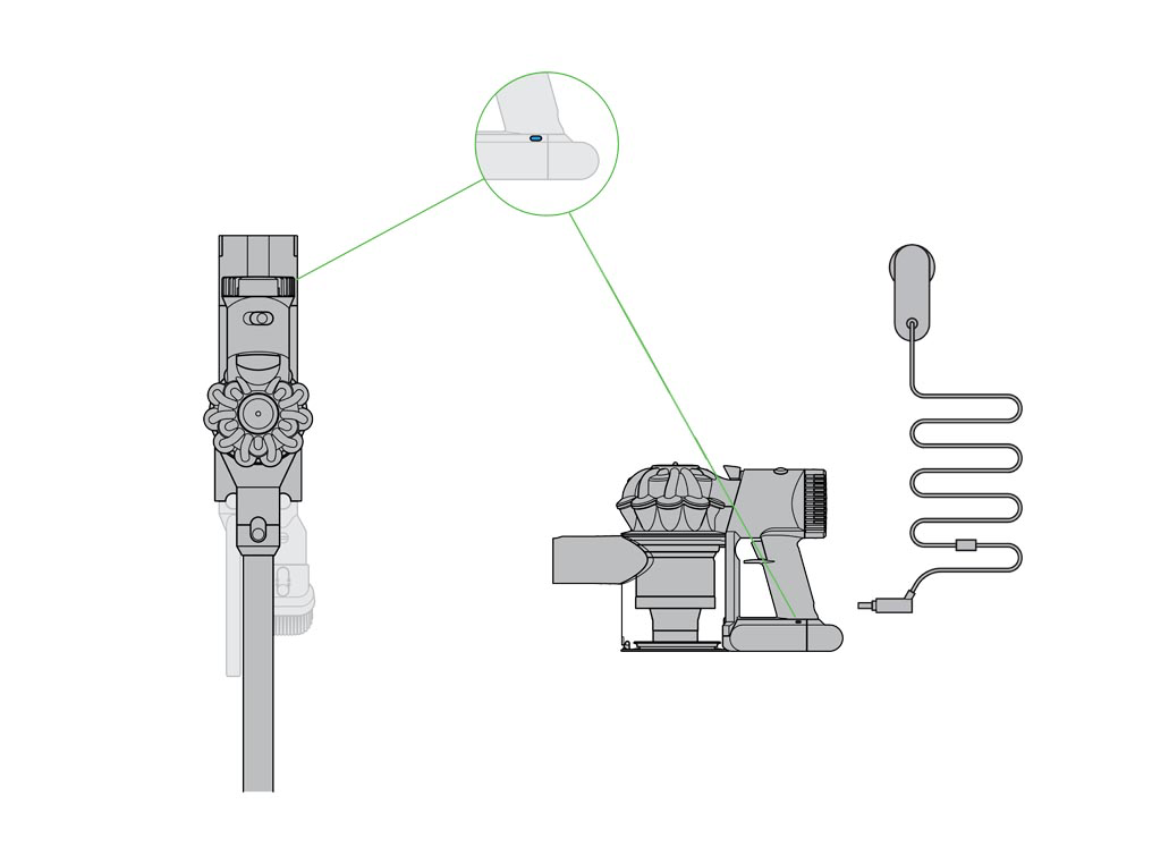
Dust and hair fibers cause false “charger not working” symptoms. Do this right:
1. Power off vacuum and remove battery
2. Use compressed air at 45-degree angle (never straight in)
3. For stubborn debris: Dip cotton swab in 99% isopropyl alcohol
4. Gently rotate swab around port contacts (10 seconds max)
5. Let dry 5 minutes before testing
Warning: Never use metal tools—Dyson’s port pins are fragile. One Reddit user destroyed his port trying to clean it with a paperclip.
Battery Revival Techniques That Actually Work

If your battery shows 0V:
1. Plug in charger for 30+ minutes (some deeply discharged batteries need time)
2. Perform hard reset: Hold power trigger for 20 seconds
3. Try charging with V6 charger (many models are compatible)
4. Leave on charger overnight (if no swelling or heat)
If voltage remains below 18V after 24 hours, the battery needs replacement. Genuine Dyson batteries last 2-4 years depending on usage cycles.
When to Call Dyson Support vs. DIY
Call Dyson immediately if:
– Battery is swollen or hot to touch
– You smell burning plastic
– Vacuum was exposed to liquids
– Unit is under warranty (check serial number)
DIY is safe when:
– Charger shows no output on multimeter
– Port has visible debris
– Battery voltage is between 18-21V but won’t charge
Dyson’s US support (866-693-9766) often sends replacement chargers free for units under 2 years old. Have your serial number ready—they’ll check warranty status instantly.
Prevent Future Charging Failures
Avoid repeat issues with these pro habits:
– Never coil charger tightly—use loose figure-8 loops
– Store at 40-80% charge if unused for weeks
– Clean port monthly with dry cotton swab
– Replace charger if cable shows ANY cracks
Most importantly: Test your charger output every 6 months with a multimeter. Catching voltage drops early prevents sudden failures.
When your Dyson V7 charger stops working, remember this golden rule: 9 times out of 10, the problem isn’t the vacuum—it’s the charger or connection. With the $5 multimeter test alone, you’ll avoid unnecessary battery replacements that cost $80+. Start with the simple fixes—outlet check, port cleaning, voltage verification—and you’ll likely have your V7 back in action before lunch. For persistent issues after these steps, contact Dyson with your test results; they’ll prioritize your case when you can prove “charger output is 0V DC.” Keep this guide handy—you’ll be the neighborhood Dyson charging expert in no time.

