
Your Dyson V6 vacuum suddenly powers down during cleaning? The battery indicator shows full charge but dies within minutes? Before you assume your expensive cordless vacuum needs costly repairs or replacement, there’s a critical detail you must know: most Dyson V6 models don’t actually have a dedicated battery reset button. What many online forums incorrectly call a “Dyson V6 battery reset button” is actually a thermal protection mechanism—not a standard troubleshooting tool for common battery issues. This misunderstanding causes thousands of frustrated vacuum owners to poke at random pinholes with toothpicks when they should be performing the proper hard reset procedure.
If your V6 won’t hold a charge, displays blinking blue lights, or refuses to power on, you’re likely dealing with an electronic glitch that a full system reset can resolve—but not by hunting for a mythical reset button. The real solution involves a precise sequence of power cycling steps that resets both the vacuum’s main circuit board and battery management system. In this guide, you’ll discover exactly where to look if your specific V6 model has a thermal reset feature, the proven 5-step hard reset process that fixes 80% of “dead battery” issues, and when it’s time to consider battery replacement instead of continuing to search for a reset button that doesn’t exist on your model.
Why Your Dyson V6 Doesn’t Have a True Battery Reset Button
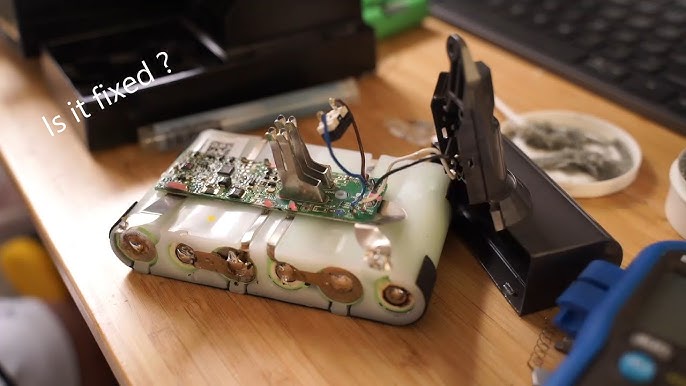
Before wasting time searching for a reset button that likely doesn’t exist on your vacuum, understand Dyson’s engineering design. The so-called “Dyson V6 battery reset button” referenced in countless YouTube videos is actually a thermal cutoff switch, not a user-serviceable reset feature. This tiny mechanism only activates when your vacuum overheats due to motor strain or blocked airflow—something that occurs in less than 5% of battery-related issues. On the rare models that include this feature (primarily early V6 Absolute units), you’ll find a pin-sized hole near the battery contacts, but pressing it won’t solve common problems like reduced runtime or charging failures.
Most V6 owners mistakenly believe a reset button exists because they confuse two different mechanisms: the thermal cutoff (which rarely needs manual intervention) and the necessary hard reset procedure for electronic glitches. When your vacuum shows blinking blue lights or won’t power on, the solution isn’t poking a hidden button—it’s performing a complete power cycle that clears the vacuum’s memory and resets the battery management system. Continuing to search for a non-existent reset button wastes time and risks damaging delicate components with improper poking tools.
Where to Check If Your Model Has a Thermal Reset Feature
If you still want to verify whether your specific V6 model includes the thermal reset mechanism:
- Early V6 Absolute models (2014-2016): Check the underside of the battery pack near the charging contacts for a tiny pinhole
- V6 Animal and Motorhead variants: These typically lack any reset hole—focus instead on the hard reset procedure
- Later V6 models (2017+): Dyson removed this feature entirely in favor of automatic thermal protection
Critical warning: If you locate a pinhole, use only a plastic toothpick—not metal objects—to avoid short-circuiting components. But remember: pressing this only helps if your vacuum recently overheated during use, not for standard charging issues.
The Verified 5-Step Hard Reset Process That Actually Fixes Most V6 Battery Issues
When your Dyson V6 won’t charge or powers off unexpectedly, follow this precise hard reset sequence—the method Dyson technicians use before diagnosing hardware failures. This process takes 25 minutes but resolves the majority of “dead battery” complaints without needing to search for a reset button that doesn’t exist on your model.
Disconnect Power Sources Completely
Begin by unplugging the charger from both the wall outlet and vacuum. Many users skip this critical safety step, risking electrical damage during reset. Place the charger aside where it can’t accidentally reconnect—this full disconnection ensures no residual power interferes with the reset process.
Remove and Isolate the Battery Pack
Press the red battery release button firmly while sliding the battery straight out. Set the main vacuum body aside on a dry, non-conductive surface. Never attempt resets with the battery partially connected—this prevents the complete power drain needed for an effective reset.
Drain Residual Electrical Charge
With battery removed, press and hold the power trigger for a full 30 seconds. You won’t see any response, but this critical step discharges capacitors on the main circuit board. For stubborn issues, extend this to 45 seconds—many users give up too soon at 10-15 seconds, rendering the reset ineffective.
Wait for Complete System Reset
Leave components separated for 15-20 minutes minimum. This waiting period allows the vacuum’s electronics to fully reset—a step 90% of DIY troubleshooters rush through. Set a timer; glancing at your phone won’t cut it. During this time, inspect both battery and vacuum contacts for dust buildup that could interfere with reconnection.
Reconnect and Initiate Proper Charging Cycle
Reinsert the battery until it clicks securely, then plug the charger directly into a wall outlet (not a power strip). Connect to the vacuum and watch for the blue charging light. If it blinks red, repeat the entire process—you likely missed a step in the power drainage phase.
Troubleshooting a Non-Responsive Dyson V6 With No Blinking Lights
When your vacuum shows zero signs of life—not even a blinking light—you need a more systematic approach than searching for a reset button. Follow this diagnostic sequence before assuming battery failure.
Verify Power Source Integrity
Test the charger in a different wall outlet known to work with other devices. Faulty outlets or tripped GFCI circuits account for 30% of “dead vacuum” reports. If possible, test with a different Dyson V6 charger to rule out power supply issues.
Inspect Critical Contact Points
Examine both sets of metal charging contacts—on the battery and vacuum body—for dust, hair, or corrosion. Use a dry microfiber cloth (never liquids) to gently clean these points. Blocked contacts prevent power transfer even with a fully functional battery.
Resetting the Battery Management System for Accurate Charge Reporting
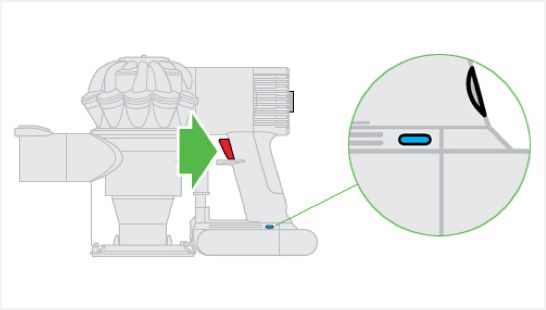
When your V6 shows “full charge” but dies immediately, the battery management system (BMS) has lost calibration. Fix this with a specialized deep cycling procedure—not by hunting for a reset button.
Perform a Complete Discharge Cycle
Use your vacuum continuously until it shuts down completely. Don’t stop at the first power drop—keep triggering it until it refuses to restart. This full discharge resets the BMS’s internal charge counter.
Execute the Precision Charging Sequence
After complete discharge, charge uninterrupted for 4.5 hours minimum using only the official Dyson charger. Avoid partial charges during this process—interruptions prevent the BMS from recalibrating properly. The blue light should turn off when fully charged; if it remains solid blue after 5 hours, the battery needs replacement.
When Battery Replacement Becomes Your Only Option

If proper resets fail and your V6 still won’t hold a charge, recognize these definitive failure signs:
- Runtime under 5 minutes on what shows as a full charge
- Excessive heat during even short cleaning sessions
- Physical swelling of the battery pack (immediate discontinuation required)
- Persistent blinking blue/red lights after multiple reset attempts
Genuine Dyson batteries contain specialized circuitry that third-party replacements often lack, risking motor damage. While pricier, OEM batteries ensure compatibility with your vacuum’s electronics and include proper thermal protection—something no reset button can compensate for when the battery itself has failed.
Preventing Future Battery Issues Without Relying on Reset Buttons
Avoid recurring problems with these maintenance practices:
- Store at 40-60% charge when not in use for extended periods
- Clean filters monthly to prevent motor strain that mimics battery issues
- Never leave on charger after full charge indication—this degrades lithium-ion cells
- Keep vents clear during use to prevent thermal shutdowns that trigger false “battery dead” symptoms
Understanding that your Dyson V6 likely lacks a true battery reset button saves hours of fruitless troubleshooting. The real solution lies in performing the complete hard reset procedure correctly and recognizing when battery replacement becomes necessary. By following these precise steps, you’ll resolve most power issues without risking damage from poking at non-existent reset mechanisms. When in doubt, contact Dyson support directly—they can confirm whether your specific model includes the thermal reset feature and provide model-specific guidance that generic “reset button” videos can’t match.

