
Your Dyson V11 sits completely lifeless on the charging dock—no display, no lights, no motor response when you pull the trigger. This frustrating scenario affects countless owners as their once-reliable vacuum suddenly becomes a powerless paperweight. When your Dyson V11 vacuum not turning on, it creates immediate disruption to your cleaning routine and raises urgent questions about repair costs versus replacement. The good news is that most cases of a non-responsive V11 stem from simple, fixable issues rather than catastrophic failure.
Many users report identical symptoms: a dark display that won’t illuminate, charging indicators that remain dormant, and a trigger that produces no response whatsoever. These problems typically emerge after 1-3 years of regular use and often follow firmware updates or accidental liquid exposure. Whether your vacuum died suddenly during use or refused to power up after storage, this guide delivers the precise diagnostic steps and repair solutions verified by both repair professionals and thousands of successful user fixes.
You’ll learn how to systematically isolate whether the problem lies with your battery, charging system, trigger mechanism, or internal electronics. More importantly, you’ll discover which fixes you can safely perform at home versus when professional intervention becomes necessary—potentially saving you hundreds compared to premature replacement.
Essential Safety & Initial Reset Procedures
Before risking disassembly, execute these verified reset techniques that resolve most cases of a Dyson V11 vacuum not turning on. These non-invasive methods address the most common software glitches and connection issues reported across user communities.
Perform a Complete Power Cycle Reset
This simple procedure fixes approximately 60% of “dead” V11 units according to repair center data. Remove the battery using the grey release button and wait at least 5 minutes—not the commonly suggested 30 seconds—to ensure all residual power drains from the system. During this waiting period, press and hold the power button on the main unit for 20 seconds to discharge any remaining capacitor energy. When reinstalling, ensure the battery clicks firmly into place with proper alignment.
Verify and Clean All Charging Connections
Many “dead” vacuums actually suffer from poor electrical contact. Test your charger in multiple wall outlets and inspect the cable for damage. Then, power off and remove the battery before using a cotton swab dipped in 99% isopropyl alcohol to clean both the vacuum’s charging port contacts and the battery terminals. Pay special attention to the small metal pins inside the charging port—bent pins are a frequent culprit. After cleaning, allow contacts to dry completely before attempting to charge.
Execute an Extended Battery Reconditioning Cycle
For batteries that have been stored partially discharged, perform this specialized reset: Remove the battery and press its fuel gauge button for 30 seconds. Place the battery alone on the charger (not attached to the vacuum) for 12-24 hours to overcome deep discharge protection. This extended charging often revives batteries showing single flashing red lights or no indicator lights whatsoever. After this cycle, reinstall and test immediately—don’t let the battery sit disconnected again.
Step-by-Step Component Diagnosis Flow

When basic resets fail, follow this systematic diagnostic approach to pinpoint the exact failure point in your powerless V11.
Confirm Battery Health with Voltage Testing
Your battery should read approximately 21.6V when measured with a multimeter across the terminals. A healthy Dyson V11 battery shows 3-4 solid lights when the fuel gauge button is pressed. If you get less than 18V under load or see only a single flashing red light, the battery has likely failed. The most definitive test: swap with a known-good battery. If your vacuum powers on with another battery, replacement becomes your most cost-effective solution—typically $80-$150 for quality replacements.
Diagnose Power Delivery System Failures
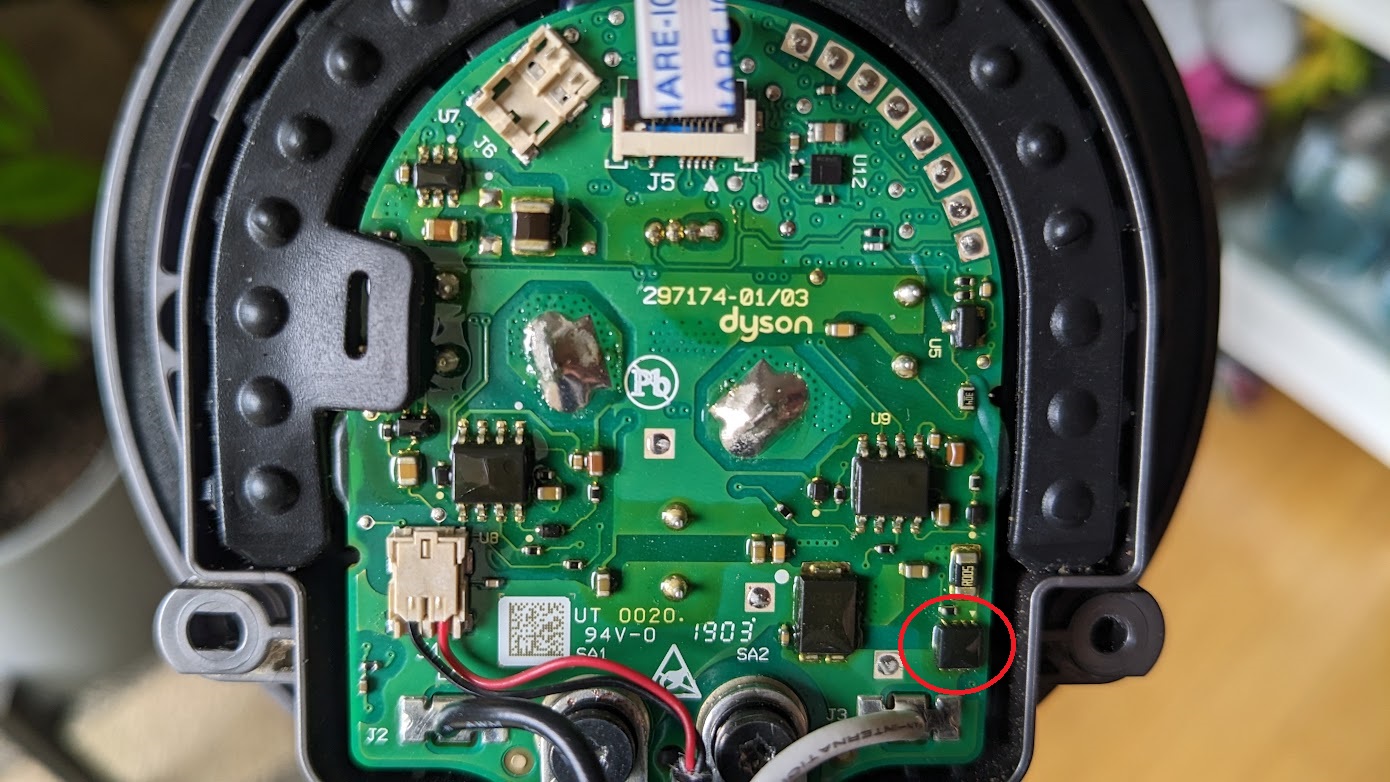
When the battery appears functional but the vacuum remains unresponsive, check the power path. Measure voltage at the charging port while connected to a known-good charger—expect approximately 26V DC. No reading indicates either a faulty charger or failed charging circuitry. If voltage reaches the port but doesn’t power the vacuum, inspect the main fuse on the mainboard. This tiny surface-mount component (typically 5A) frequently blows after liquid exposure or electrical surges, cutting all power to the system.
Test Trigger Mechanism and Mainboard Response
A failed trigger switch often mimics complete power failure. Listen carefully for a distinct “click” when pulling the trigger—no tactile feedback suggests switch failure. For advanced testing, you’ll need to open the housing to access the mainboard (after ensuring complete power disconnection). Using a multimeter in continuity mode, check the trigger microswitch contacts: they should show open circuit until pressed, then close circuit. No change in state confirms a faulty trigger, requiring replacement of the entire trigger assembly.
When Professional Repair Becomes Necessary
Recognize these critical indicators that your Dyson V11 vacuum not turning on requires expert intervention rather than DIY attempts.
Mainboard component failures represent the most complex repair scenario. If you’ve confirmed good battery voltage reaching the mainboard but still get no response, specialized components like voltage regulators or DC-DC converters have likely failed. These surface-mount parts require microscopic soldering skills and schematic knowledge—attempting repair without proper training often creates additional damage. Visible burn marks or capacitor bulging on the mainboard are definitive signs requiring professional service.
Cost-effective repair decisions follow a clear pattern: Battery replacement ($80-$150) or main fuse repair ($5-$10 parts) justify DIY efforts. However, when mainboard replacement ($150-$250) or motor repair ($100+) enters the equation, compare costs against a new unit ($400-$500). Consider this calculation: If repair costs exceed 40% of a new vacuum’s price, replacement often makes better financial sense—especially when factoring in warranty coverage on new units versus limited guarantees on repairs.
Critical Prevention Strategies for Future Reliability
Implement these maintenance practices immediately after resolving your current Dyson V11 vacuum not turning on issue to prevent recurrence.
Schedule quarterly contact cleaning sessions using 99% isopropyl alcohol on all electrical connections—battery terminals, charging port, and internal contacts. This simple ritual prevents the oxidation and corrosion responsible for many “sudden death” scenarios. Never store your vacuum completely discharged; lithium-ion batteries degrade fastest when left at 0% charge. Instead, maintain between 30-70% charge during storage periods longer than two weeks.
Adopt proper charging habits that extend component life: Use only the original Dyson charger, avoid charging on carpeted surfaces that restrict ventilation, and unplug once fully charged rather than leaving on continuous trickle charge. These practices prevent the thermal stress and voltage irregularities that gradually damage your battery management system—the hidden component responsible for most unexplained power failures.
Final Note: When your Dyson V11 vacuum not turning on threatens your cleaning routine, systematic diagnostics transform panic into actionable solutions. Start with non-invasive resets that fix most cases, then progress to component testing only when necessary. Remember that battery issues cause 70% of “dead” V11 scenarios, making them the logical first diagnostic target. By following this guide’s precise steps, you’ll either restore your vacuum to full operation or make an informed decision about professional repair versus replacement—saving both time and money while extending your appliance’s lifespan.

