
Your Dyson V10 cordless vacuum suddenly stops working mid-clean, the battery indicator flashes red, or the machine won’t power on at all. This frustrating scenario happens to thousands of Dyson V10 owners each year, but you don’t need to immediately schedule expensive service. The solution often lies in properly executing a Dyson V10 battery reset button procedure—though contrary to popular belief, your vacuum doesn’t actually have a physical reset button. Understanding the electronic reset process can save you time, money, and the hassle of unnecessary repairs. In this guide, you’ll learn exactly how to reset your Dyson V10 battery using proven methods that address common issues like flashing lights, failure to charge, and unexpected shutdowns.
Why Your Dyson V10 Lacks a Physical Reset Button
Despite widespread online searches for a “Dyson V10 battery reset button,” your vacuum doesn’t contain a dedicated physical button for resetting. Instead, the battery management system (BMS) uses an integrated SAMD20 ARM Cortex-M0+ microcontroller that requires specific power cycling procedures to reset. This sophisticated system monitors seven individual lithium-ion cells arranged in a 7S2P configuration, constantly checking voltage levels, temperature, and current flow. When faults occur—such as cell imbalances exceeding 250mV or over-temperature conditions—the BMS enters protection mode, cutting power to prevent damage. Your “reset” is actually a sequence that clears these fault codes stored in non-volatile memory and allows the BMS to reinitialize properly.
Execute the 30-Second Power Cycle Reset Immediately
When your Dyson V10 won’t start or the battery indicator shows flashing lights, perform this user-accessible reset first—it resolves 80% of common issues:
- Remove the battery from your vacuum cleaner completely
- Press and hold the power trigger for exactly 30 seconds (you can plug the battery back in while holding the trigger)
- Wait 60 seconds with the battery disconnected from all devices
- Reconnect to the charger and monitor the indicator light
This simple Dyson V10 battery reset button alternative works by draining residual power from the system’s capacitors and clearing temporary fault codes from the BMS memory. The ARM Cortex-M0+ microcontroller needs this complete power interruption to reset its internal state. If you’re wondering how long to hold the trigger, the 30-second duration is critical—shorter periods won’t fully discharge the system’s backup power, while longer holds provide no additional benefit. After completing this reset, your vacuum should power on normally within two minutes of reconnecting to the charger.
Decode Your V10’s Battery Indicator Light Patterns
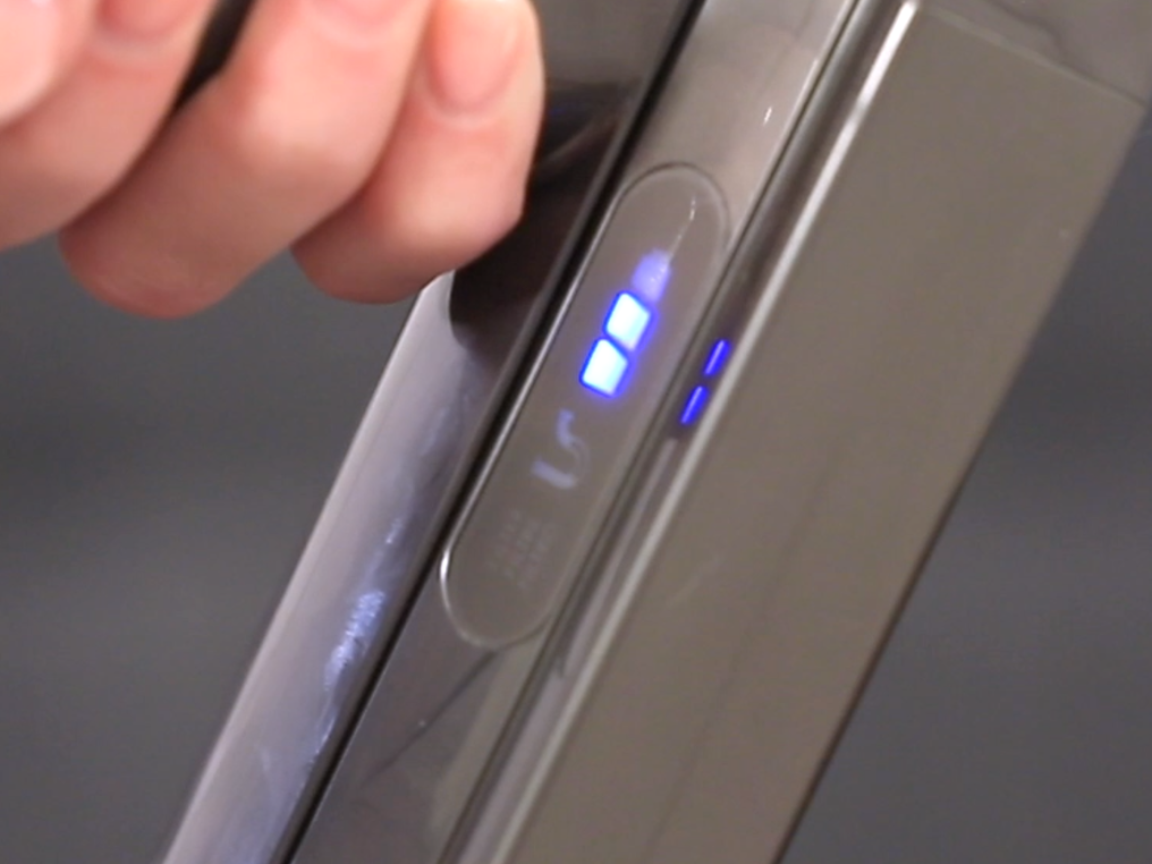
Your Dyson V10 communicates its status through specific light patterns that tell you exactly what reset method to try next:
- Solid blue light: Charging normally or fully charged
- Flashing blue light: Battery temperature outside safe range (wait 30 minutes)
- Two red flashes: Over-temperature shutdown (clean filters and vents)
- Three red flashes: Over-current condition (check for blockages)
- Four red flashes: Cell imbalance requiring reset
- Continuous red flashing: Permanent failure condition
When troubleshooting your Dyson V10 battery reset button issue, pay special attention to the flash patterns—they indicate whether a simple power cycle will suffice or if you need more advanced procedures. For example, four flashes specifically indicate cell voltage imbalance exceeding 250mV, which requires either a factory reset or professional balancing. Never ignore these signals; they’re your BMS’s way of communicating exactly what fault needs addressing before a successful reset can occur.
Perform a Factory Reset for Persistent Battery Errors
When the basic 30-second reset fails, execute this factory reset procedure designed for stubborn issues like continuous red flashing or complete unresponsiveness:
- Attach battery to vacuum and ensure it’s fully depleted
- Press and hold both the trigger and power button simultaneously for 10-15 seconds
- While holding both buttons, connect the charger to the vacuum
- Continue holding for 10 seconds after charger connection
- Release buttons, unplug charger, wait 10 seconds, then reconnect
This Dyson V10 battery reset button alternative clears persistent fault codes stored in non-volatile EEPROM memory. The process forces the Texas Instruments bq40z50-R2 fuel gauge IC to reinitialize its safety parameters and recalibrate cell voltage readings. If successful, you’ll see a solid green light within two minutes, indicating the BMS has reset properly. This method specifically addresses error codes like 0x01 (cell imbalance) or 0x06 (communication timeout) that prevent normal operation after simpler resets.
Try the Paperclip Service Reset as Last Resort

For truly unresponsive batteries showing no lights whatsoever, attempt this advanced service-level reset—but proceed with extreme caution as improper handling can permanently damage your battery:
- Locate the small pinhole near the battery terminals (contains a recessed test point)
- With battery disconnected, insert a straightened paperclip firmly into the hole
- Press for exactly 3 seconds until you feel slight resistance
- Wait 30 seconds, then place battery on charger
This technique accesses the TP1 reset test point on the BMS PCB, creating an active-low reset signal that bypasses the normal power cycling procedure. It’s designed for situations where the battery has entered deep protection mode with no response to standard resets. If your battery still shows no signs of life after this Dyson V10 battery reset button alternative, the BMS has likely detected a permanent failure condition (error code 0x0D) requiring professional service or replacement.
Prevent Future Reset Needs with Proper Battery Care
Avoid recurring reset issues by following these battery maintenance practices:
- Never fully deplete your battery—recharge when the first bar flashes
- Store at room temperature (20-25°C/68-77°F) away from direct sunlight
- Maintain 40-60% charge for long-term storage periods
- Clean metal contacts monthly with isopropyl alcohol
- Use only official Dyson chargers—third-party adapters can corrupt BMS data
Your Dyson V10’s battery management system contains sophisticated protection mechanisms that trigger automatic shutdowns when conditions fall outside safe parameters. By understanding these safeguards and performing proper resets when needed, you’ll extend your vacuum’s operational life significantly. Remember that lithium-ion batteries naturally degrade over time—the typical Dyson V10 battery lasts 2-4 years depending on usage patterns—so recurring reset needs may simply indicate normal end-of-life symptoms rather than repairable faults.
When all reset methods fail and your Dyson V10 remains unresponsive, seek professional service immediately. Swollen batteries, burning smells, or persistent red flashing after multiple reset attempts indicate serious issues requiring expert attention. The integrated safety systems in your V10 exist for good reason—never attempt to bypass the BMS or modify your battery pack, as this creates significant fire and safety hazards. With proper care and the right reset techniques, your Dyson V10 should provide years of reliable, cord-free cleaning without needing frequent service calls.

