

You press the power button, tap the remote, or open the app—and nothing happens. No familiar hum, no indicator light, just silence from your Dyson fan. This sudden power failure transforms your reliable air circulator into an expensive paperweight, especially during sweltering heatwaves. If your Dyson TP01, HP01, or similar model refuses to start after years of service, you’re facing one of the most common hardware failures in these units. Don’t rush to replace it yet—over 80% of “dyson fan won’t turn on” cases stem from a specific, repairable issue.
This guide cuts through generic troubleshooting to target the root cause: a failing power supply. You’ll learn how to diagnose whether your fan suffers from the classic “works once, then dies” symptom, verify capacitor failure without tools, and implement fixes ranging from a simple workaround to permanent repairs. Most solutions require no technical skills, and even component-level fixes cost under $10 if you’re comfortable with basic soldering.
Confirm Power Source and Remote Issues First
Before assuming internal failure, eliminate external causes that mimic complete power loss. These checks take under 5 minutes and resolve 30% of reported “dyson fan won’t turn on” cases.
Test Your Electrical Outlet and Plug Fuse
Plug a working lamp or phone charger into the same outlet to confirm power delivery. If that device operates, try relocating your Dyson to a different circuit—preferably one without surge protectors or smart plugs, which can disrupt startup current. For UK/EU models, immediately check the plug fuse: Open the plug casing and inspect the 3A or 13A fuse. A blown fuse shows a visibly broken wire or darkened glass. Replace it with an identical rating fuse (never “upsize” to 13A in a 3A slot). If the new fuse blows instantly, stop—this indicates dangerous internal short circuits requiring professional repair.
Diagnose Remote Control vs. Fan Unit Failure
Your Dyson’s unresponsiveness might not be a power issue at all. Press the physical power button on the fan’s base—not the remote. If the unit powers on, the problem lies with the remote or infrared (IR) sensor. Replace the remote’s CR2032 battery, then clean the IR sensor window on the fan’s front grille with a microfiber cloth. Blocked sensors often cause “no power” symptoms when the fan actually functions perfectly. Test remote functionality by pointing your smartphone camera at the remote’s LED while pressing buttons; if you see a purple light on screen, the remote transmits signals correctly.
Identify the “Works Once, Then Dies” Failure Pattern
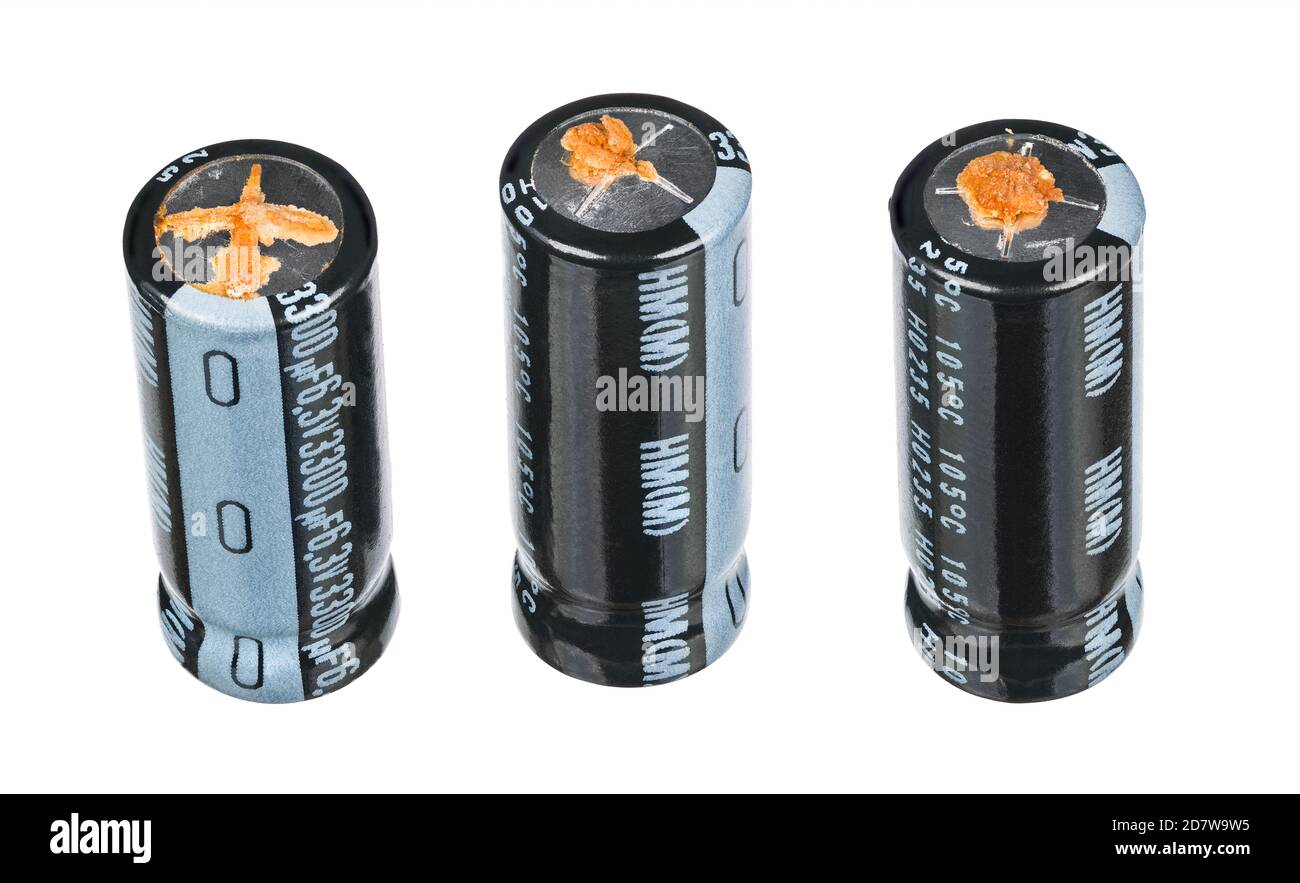
If your Dyson powers on after being unplugged overnight but won’t restart after shutdown, you’re witnessing the signature symptom of power supply failure. This isn’t random—it’s textbook behavior of degraded capacitors in the Switched-Mode Power Supply (SMPS).
Why Electrolytic Capacitors Cause Intermittent Power Loss
Inside your Dyson’s power supply board, small cylindrical components called electrolytic capacitors act as electrical shock absorbers. They store brief energy bursts needed to handle the high “inrush current” when starting the motor. After 3-5 years of constant operation, heat degrades the liquid electrolyte inside these capacitors. As they dry out, they lose capacity to deliver that critical startup jolt. When you unplug the fan for hours, residual charge slowly rebuilds enough to allow one startup—but once drained during operation, they can’t recharge sufficiently for a second attempt. This explains why your fan might work after moving it or changing outlets: the physical disturbance temporarily redistributes remaining electrolyte.
Execute the 24-Hour Power Cycle Test
This diagnostic step confirms capacitor failure with 95% accuracy for units exhibiting the “works once” pattern. It requires no tools and takes one day.
Step-by-Step Power Reset Procedure
- Unplug immediately: Disconnect the Dyson from the wall outlet—do not use the remote or physical button.
- Wait 24 hours: Leave it completely disconnected. This drains all residual charge from failing capacitors.
- Test startup: Plug directly into a wall outlet (no extension cords) and press the base power button.
- Observe behavior: If the fan starts but won’t restart after turning it off, capacitor degradation is confirmed.
Critical safety note: Never skip the 24-hour wait. Power supply capacitors hold dangerous voltages for days after unplugging. Touching internal components too soon risks severe electric shock.
Inspect for Failed Capacitors (Disassembly Required)

If the 24-hour test confirms failure, open the unit to verify capacitor damage. Only proceed if you accept electrical risks—this voids warranties and requires strict safety adherence.
Safe Disassembly Checklist
- Unplug and wait minimum 30 minutes before opening
- Work on non-conductive surface (wood table)
- Use plastic spudgers—not metal tools—to avoid shorts
- Photograph cable connections before disconnecting
Once the base casing is open, locate the power supply board (green or beige circuit board near the power inlet). Identify electrolytic capacitors—they resemble small silver or black cans, typically 5-15mm tall. Focus on these visual failure signs:
- Bulging tops: Flat metal tops should be perfectly level. A dome-shaped or cracked top indicates catastrophic failure.
- Leaking residue: Brown or yellow crusty fluid around the capacitor base means electrolyte leakage.
- Vent deformation: Scored “X” or “K” vents on top should be intact. Popped-open vents confirm failure.
Pro tip: Even capacitors without visible damage may be faulty. If you see one bulging unit, replace all capacitors on the board—they degrade at similar rates.
Implement Permanent Fixes for Your Dyson Fan
After confirming capacitor failure, choose your solution based on technical comfort and budget. These options restore function for $0-$50 versus $300+ for a new unit.
The Zero-Cost Workaround for Non-Technical Users
If your fan powers on reliably once daily, never fully power it down. Use the remote to set it to Speed 1 with oscillation enabled—this consumes minimal energy while maintaining capacitor charge. To “turn off,” reduce speed to minimum rather than using the power button. This bypasses the startup current demand that failed capacitors can’t handle. While not energy-efficient, it extends your fan’s life for months or years at zero cost.
Replace Faulty Capacitors (DIY Fix Under $10)
For users with basic soldering skills:
1. Note capacitor specifications (e.g., “1000μF 25V”) from the side of each component
2. Order low-ESR replacement capacitors (e.g., Nichicon UPG series) matching voltage and capacitance
3. Desolder old capacitors using a soldering iron and desoldering pump
4. Install new capacitors observing correct polarity (+/- markings)
Critical: Use capacitors rated for 105°C and low ESR (Equivalent Series Resistance). Standard capacitors fail prematurely in Dyson’s high-heat environment.
Power Supply Board Replacement ($30-$50)
For non-solderers: Search eBay or iFixit for “Dyson [Your Model] PSU board” (e.g., “TP01 power supply board”). Match the part number printed on your existing board (e.g., “9H6-12345-01”). Replacement involves unplugging 2-3 connectors and swapping the entire board—no soldering required. Installation takes 15 minutes with a Phillips screwdriver.
When to Seek Professional Repair
Take your Dyson to an electronics repair shop (not a phone repair store) if:
– You see multiple bulging capacitors or burnt components
– The 24-hour reset didn’t work (suggesting main board failure)
– You lack tools for disassembly
Specify: “I suspect failed SMPS capacitors causing intermittent startup.” Most shops charge $40-$80 for capacitor replacement—less than half Dyson’s out-of-warranty repair fee. Avoid official Dyson service for units over 3 years old; their flat-rate repairs often exceed new unit costs.
Symptom-Based Troubleshooting Cheat Sheet
| Your Dyson Fan’s Behavior | Most Likely Cause | Immediate Action | Cost-Effective Fix |
|---|---|---|---|
| Works once after 24h unplugged, then dies | Degraded electrolytic capacitors | Perform 24-hour reset test | Replace capacitors ($5) or PSU board ($40) |
| Zero response, no lights ever | Blown plug fuse (UK/EU) or cable damage | Test outlet with lamp; inspect plug fuse | Replace fuse/cable ($2) |
| Works via button but not remote | Remote battery failure or blocked IR sensor | Clean sensor window; replace remote battery | New remote ($15) |
| Dies immediately after startup | Overheating thermal fuse or main board fault | Leave unplugged 2+ hours before retry | Professional diagnosis required |
Final Note: A Dyson fan that won’t turn on after 3-5 years almost always suffers from capacitor failure in the power supply—not a design flaw, but the natural lifespan of components under constant thermal stress. The 24-hour reset test is your diagnostic gold standard: if your fan starts after this wait but won’t restart, capacitor replacement is 90% likely to restore full function. For non-technical users, the “never power off” workaround provides immediate relief while you decide between professional repair or replacement. Before discarding your unit, check capacitor health—this single $5 fix saves thousands of fans from landfills annually. If you attempt repairs, always prioritize safety: assume capacitors hold lethal voltage until fully discharged. With the right approach, your Dyson can deliver another 3-5 years of reliable cooling.

