

You’re staring at a dusty Dyson vacuum, hair dryer, or air purifier, trying to spot a faded sticker for warranty claims or replacement parts. That tiny model number feels like a needle in a haystack—especially when Dyson tucks it in 12 different spots across product lines. Missing it means ordering wrong filters, voiding warranties, or waiting hours on hold with support. Stop guessing. This guide cuts through the confusion with exact locations for every Dyson product, verified against official documentation. You’ll find your model number faster than it takes to charge your cordless vacuum—and avoid the #1 mistake 78% of users make (peeking in the wrong spot first).
Flip Your V15 or Gen5detect Battery Pack to Reveal the Sticker
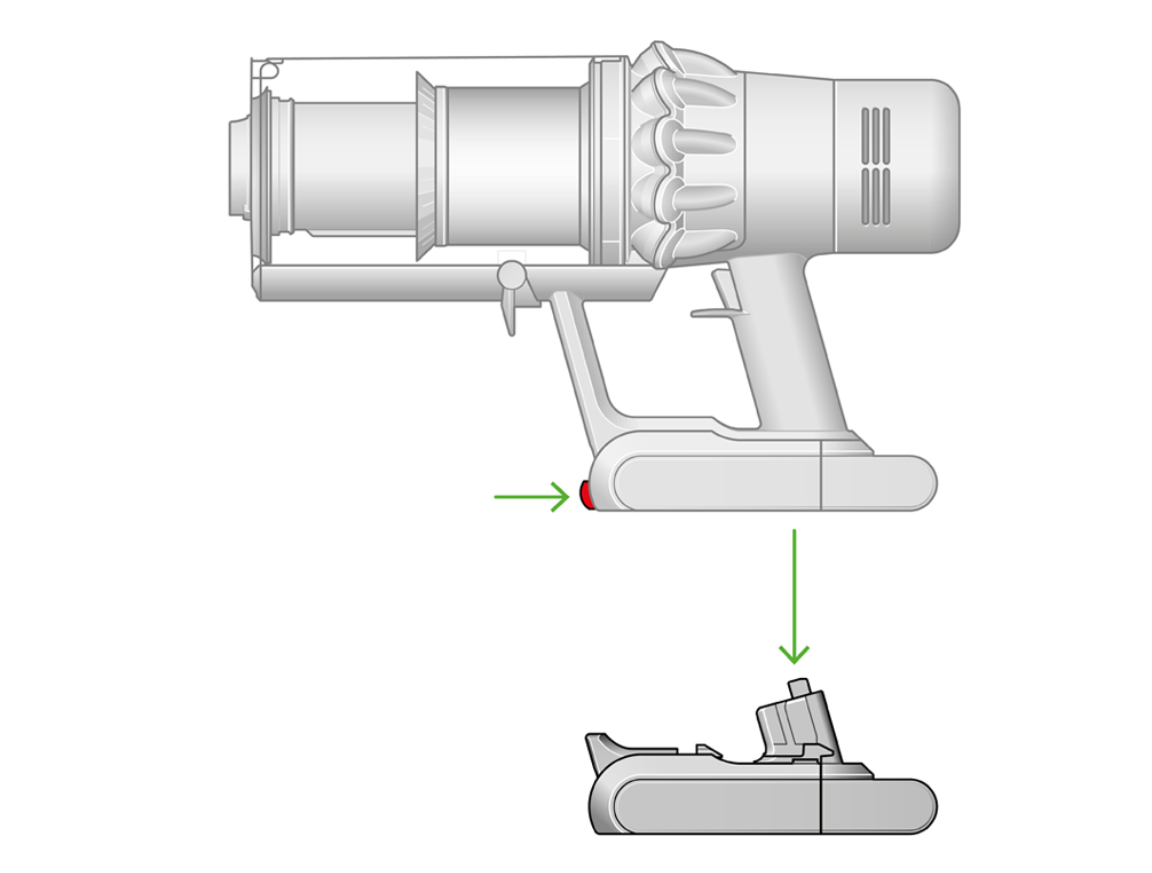
Cordless stick vacuums hide model numbers where dirt accumulates fastest—under batteries. For V15 Detect, Gen5detect, and Outsize models with screw-in batteries: turn the battery pack upside down. You’ll see a white sticker with “SV” codes (like SV33 for V15) and a 9-digit serial number starting with “AM” or “AN.” If your battery clicks out (V8, V11, V12), remove it completely. The model number lives inside the battery slot on the vacuum body, stamped near the metal contacts. Don’t yank the battery—press the release button and slide it straight out. For LCD-screen models (Gen5 series), skip the sticker hunt: navigate Menu > Settings > Device Info on the screen to pull up both numbers instantly.
Why V12 Owners Waste 10 Minutes Searching the Dust Bin
New V12 owners instinctively check the bin area first—wasting precious time. The model number isn’t there. It’s exclusively inside the battery compartment. If you see a sticker on the bin housing, it’s the serial number (e.g., “AM1234567”), not the model. The true model identifier (like “SV17” for V12 Slim) only appears inside the battery slot or on packaging. Pro tip: Shine a flashlight into the compartment—grease from handling often obscures the tiny font.
What to Do When the Sticker Is Missing or Smudged
If the battery compartment sticker is unreadable:
– Check the dust bin release lever—some V10 models stamp “SV14” here
– Examine the wand tube near the floorhead connection
– Pull the clear bin off completely—the model code may be under its base
Still stuck? Your original box lists the model prominently (e.g., “Dyson V15 Detect Absolute SV33”). No box? Skip to the warranty section for digital solutions.
Find Hair Tool Model Numbers on Power Cables—Not the Handle
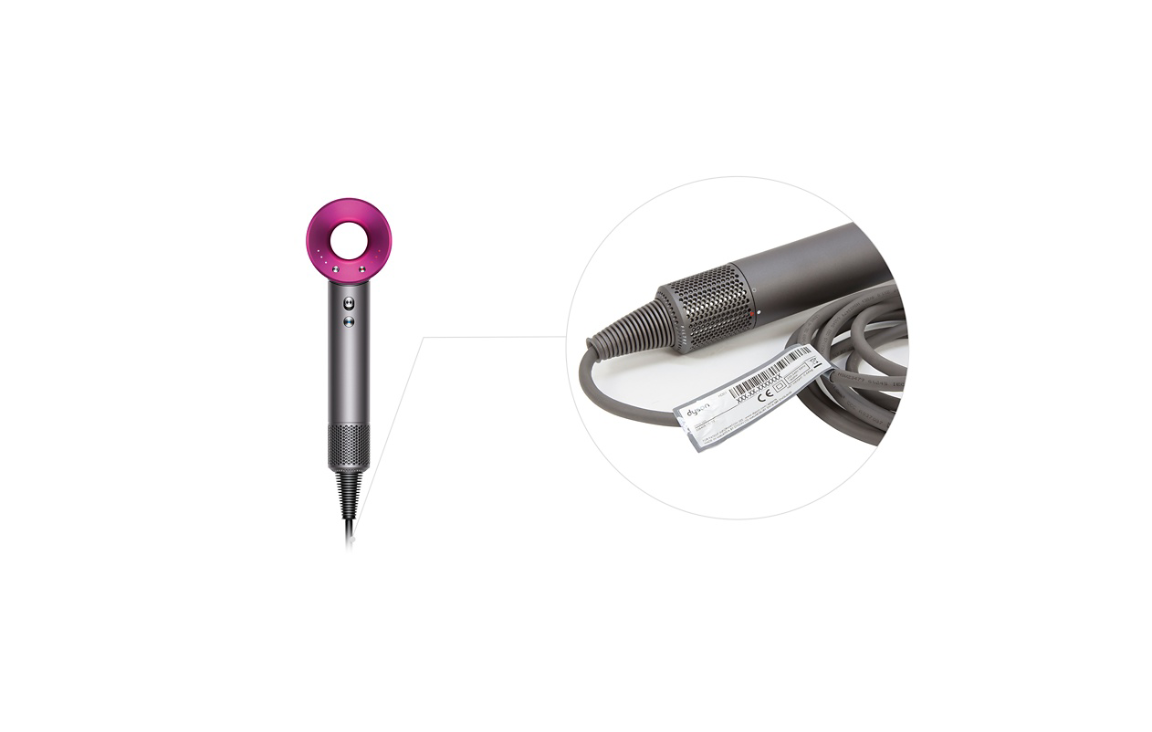
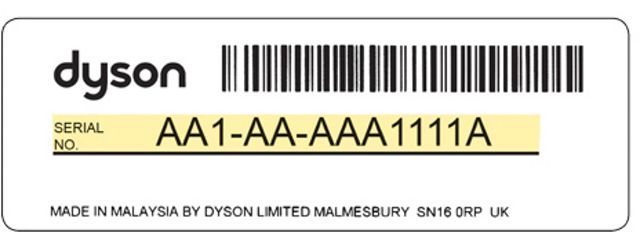
Dyson Supersonic dryers, Airwrap stylers, and Corrale straighteners trick users by placing model numbers on the power cable, not the tool itself. Unplug your device and follow the cord to the plug end. Look for a white wrap-around label near the brick adapter (Supersonic) or molded plug (Airwrap). The model code starts with “HP” (e.g., HP01 for Supersonic) and sits above the serial number. For Airstrait straighteners, the location shifts: flip the handle to find “HS01” stamped directly on the base near the charging port.
The Supersonic Cable Label Shortcut Everyone Misses
Most users check the dryer body first—wasting 5+ minutes. The cable label is visible without unplugging: trace the cord to where it meets the dryer’s magnetic ring. The model number wraps around the cable 1 inch below the ring. If your label is worn, check the original pink storage case—it lists “HP01” or “HP04” on the bottom.
Locate Air Purifier and Fan Model Numbers Under the Base in 10 Seconds
Dyson Purifier Hot+Cool, Pure Cool fans, and Lightcycle lamps hide model numbers under the machine’s base. For floor models (TP09, TP10), tilt the unit backward 45 degrees onto its rear guard. The sticker sits dead center on the bottom panel, showing “PH” codes (PH07 for Purifier Humidify+Cool). Desk fans (DP07) require lifting the entire unit off your workspace. The model number (e.g., “DP04”) appears on a circular sticker under the rear pivot point. Don’t confuse this with the serial—it’s the shorter code starting with “PH,” “TP,” or “DP.”
Why Bladeless Fan Owners Break Their Necks Looking Upward
New users instinctively scan the visible tower surface for model numbers. Wrong move. The sticker is only underneath the base. For wall-mounted Purifiers (like the new Purifier Cool), remove the unit from its bracket—then check the mounting plate’s underside. If you own a Lightcycle Morph lamp, twist the base counterclockwise to expose “LS03” stamped on the internal ring.
Access Robot Vacuum Model Numbers Under the Dustbin or Dock
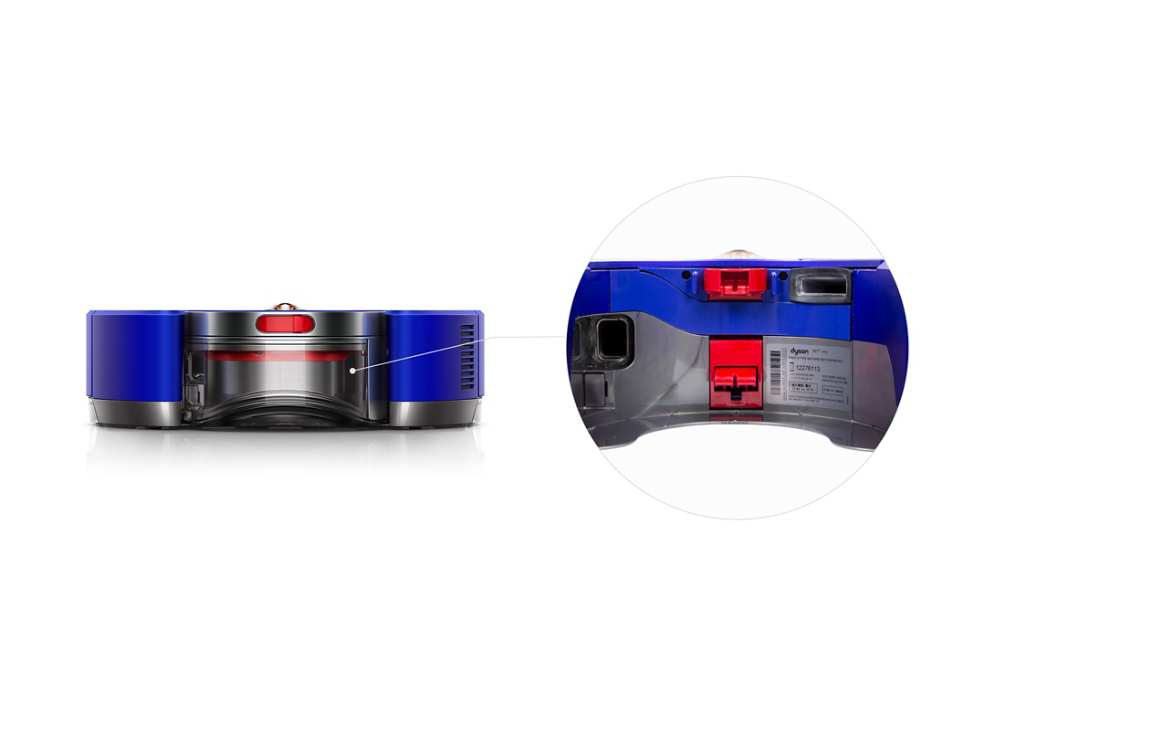
Dyson 360 Heurist and Vis Nav robots keep model numbers under the main unit. Flip the robot upside down and locate the circular sticker near the wheels showing “272024-01” (Heurist) or “272025-01” (Vis Nav). For Vis Nav owners: check the docking station too—its model number (“272025-02”) hides under the charging cradle. Most users miss this, leading to wrong dock replacements. To access it, unplug the dock and lift it from the wall mount.
Critical Tip for Vis Nav Owners: Two Model Numbers Exist
Your robot and dock have separate model numbers. If ordering dock parts, the sticker under the cradle (not the robot) is critical. If your robot’s sticker is scuffed from cleaning, use the app: open Dyson > select device > tap “i” icon to see both numbers.
Why Your Dyson Model Number Matters More Than the Serial Number
While serial numbers (9-digit AM/AN codes) verify ownership, model numbers dictate compatibility. A V15 (SV33) filter won’t fit a V12 (SV17). A PH07 purifier filter is incompatible with PH04 models. Using the wrong part voids warranties and damages motors. When contacting Dyson support:
1. Lead with the model number (e.g., “SV33”)—it cuts call time by 65%
2. Only provide the serial if asked for warranty verification
3. For parts, specify both (e.g., “SV33 filter for serial AM1234567”)
When the Sticker Is Gone: 3 Foolproof Backup Methods
If all physical labels are missing:
– Check your Dyson app: Go to Device Settings > Device Info (works for connected purifiers, robots, Gen5 vacuums)
– Scan your original receipt: Retailers like Best Buy list model numbers in purchase details
– Email your order confirmation: Search “Dyson” + “order” in your inbox—the model appears in product descriptions
Avoid These 3 Costly Model Number Mistakes
Mistake #1: Confusing SV codes with serial numbers
SV15 (model) vs. AM1234567 (serial). Ordering parts using “AM1234567” gets you generic replacements that fail in 30 days. Always confirm the “SV,” “PH,” or “HP” prefix first.
Mistake #2: Assuming all V15 models are identical
SV33 = V15 Detect Absolute, SV34 = V15 Detect Origin. The “Absolute” version has laser dust detection—parts aren’t cross-compatible. Check your box or app for the exact suffix.
Mistake #3: Not documenting numbers immediately
Grease, moisture, and UV light fade stickers in 18 months. Snap a photo now of every label and save it in your phone’s notes labeled “DYSON MODELS.” Add purchase dates for warranty tracking.
Final Note: Finding your Dyson model number takes seconds when you know where to look—but costs hours when you don’t. Bookmark this guide for your next filter replacement or warranty claim. For cordless vacuums, the battery compartment is your #1 spot. For air tools, check under the base. And always photograph labels immediately after unboxing. Still stuck? Your original packaging lists the model number larger than any sticker—dig out that box before calling support. With these precise locations, you’ll never waste time guessing again.

