
Your Dyson V11 cordless vacuum not working properly can turn a simple cleaning task into a frustrating battle. That familiar hum you rely on for spotless floors has disappeared, leaving you with a silent, expensive paperweight. Whether your vacuum dies after 30 seconds, won’t turn on at all, or struggles with basic suction, most V11 failures stem from predictable issues that you can diagnose and often fix yourself—without professional help.
When your Dyson V11 cordless vacuum not working as expected, it’s usually not a catastrophic failure. The truth is 80% of V11 problems come from five common culprits: clogged filters, hidden blockages, failing batteries, dirty charging contacts, or overheating motors. This guide cuts through the confusion with a precise, step-by-step diagnostic flow that targets the exact cause of your V11’s malfunction. Stop guessing and start fixing—within 30 minutes, you’ll know whether your issue requires a simple filter wash or professional service.
Decode Your Dyson V11’s Warning Lights Before Wasting Time
Your vacuum’s display isn’t just for show—it’s your first diagnostic tool when your Dyson V11 cordless vacuum not working properly. Ignoring these visual cues means wasting hours on unnecessary fixes when the answer is literally flashing in your face.
What Your V11’s Red Flashing Light Really Means
That persistent red flashing light on your V11 isn’t random—it’s screaming about power issues. When you see a red light flashing near the trigger or charging dock, your vacuum is telling you it can’t maintain proper voltage. Don’t immediately assume battery failure—9 of 10 times this indicates dirty charging contacts or a faulty wall outlet. Grab a dry microfiber cloth and wipe both the vacuum’s metal contacts and charger pins. If the red flash continues after cleaning, test with a different outlet—many homeowners waste money replacing batteries when a tripped circuit breaker was the real culprit.
Solid Red Light vs. Flashing Red/Blue: Critical Distinctions
A solid red light means your battery has overheated—likely from extended use on high power mode. Let your V11 cool for 60 minutes away from direct sunlight before attempting restart. If you see flashing red and blue lights simultaneously, your vacuum has detected a major blockage triggering motor protection. This isn’t just a clog warning—ignoring it risks permanent motor damage. Immediately power down and begin blockage checks before heat destroys internal components.
Fix Charging Failures That Mimic Dead Battery Symptoms

When your Dyson V11 cordless vacuum not working shows zero response, charging system failures account for 65% of cases. Most owners jump straight to battery replacement when simple contact cleaning could solve the problem in 90 seconds.
Test Your Charger With This Pro Method
Before blaming the battery, verify your charger’s output with a multimeter set to DC voltage. A functioning Dyson V11 charger must read between 21-22 volts when connected to power. Warning: Anything below 20 volts means immediate charger replacement—using underpowered chargers damages batteries over time. If your multimeter shows proper voltage but the vacuum won’t charge, inspect the metal contacts on both charger and vacuum for green corrosion. Dip a cotton swab in isopropyl alcohol and gently clean until contacts shine like new coins.
Why Your V11 Won’t Charge After Sitting Overnight
If your vacuum worked yesterday but is completely dead today, check for these hidden issues:
– The wall outlet’s circuit breaker has tripped (test with another device)
– Charging dock’s internal fuse has blown from power surges
– Battery terminals inside the vacuum have oxidized from humidity
Pro tip: Unplug the charger for 2 minutes, then plug it directly into the vacuum (bypassing the dock). If it charges, your docking station needs replacement—not the battery.
Eliminate Blockages That Trigger False Motor Failures
The #1 reason your Dyson V11 cordless vacuum not working appears “broken” is hidden blockages triggering safety shutdowns. A single hair strand wrapped around the brush bar can mimic complete motor failure—wasting your time on unnecessary repairs.
Perform the Wand Suction Test in 30 Seconds
Disconnect the wand from the main body and power on the vacuum. Place your palm firmly over the hose opening at the top of the wand. You must feel intense suction pulling your skin inward—if not, you’ve found your problem area. Work backward through the system: check the wand for obstructions, then the hose connection, then the cyclone assembly. Use a stiff wire or straightened coat hanger to gently dislodge stubborn clogs without damaging plastic components.
Critical Blockage Points Most Owners Miss
Focus your search on these trouble spots where debris accumulates invisibly:
– The narrow channel between dust bin and cyclone assembly (remove bin completely)
– The brush bar end caps where hair wraps tightly around the axles
– The small air intake holes on the floor head’s underside
– The flexible hose connection behind the bin release button
Warning: Never use sharp objects to clear blockages—scratches inside airways create turbulence that reduces suction permanently.
Diagnose Battery Failure With These Exact Symptoms
When your Dyson V11 cordless vacuum not working dies within minutes, battery degradation is likely—but don’t replace it prematurely. True battery failure shows specific patterns that distinguish it from other issues.
The 5-Minute Runtime Test That Confirms Battery Death
Charge your V11 fully, then run it on medium power (not max) with an empty bin and clean filters. If runtime falls below 12 minutes, your battery has reached end-of-life. Genuine Dyson batteries deliver 30-60 minutes depending on model and settings. Note that cold temperatures (<50°F) temporarily reduce capacity—bring your vacuum indoors for 2 hours before testing if stored in a garage.
How to Replace Your V11 Battery in 90 Seconds
The V11 features tool-free battery access—no screws required. Locate the small release button on the battery compartment cover, press firmly while sliding the cover downward. Remove the old battery pack and insert the new one with contacts aligned. Critical step: After installation, leave the vacuum charging for 3 full hours before first use—this recalibrates the battery management system.
Stop Ignoring These Filter Maintenance Mistakes
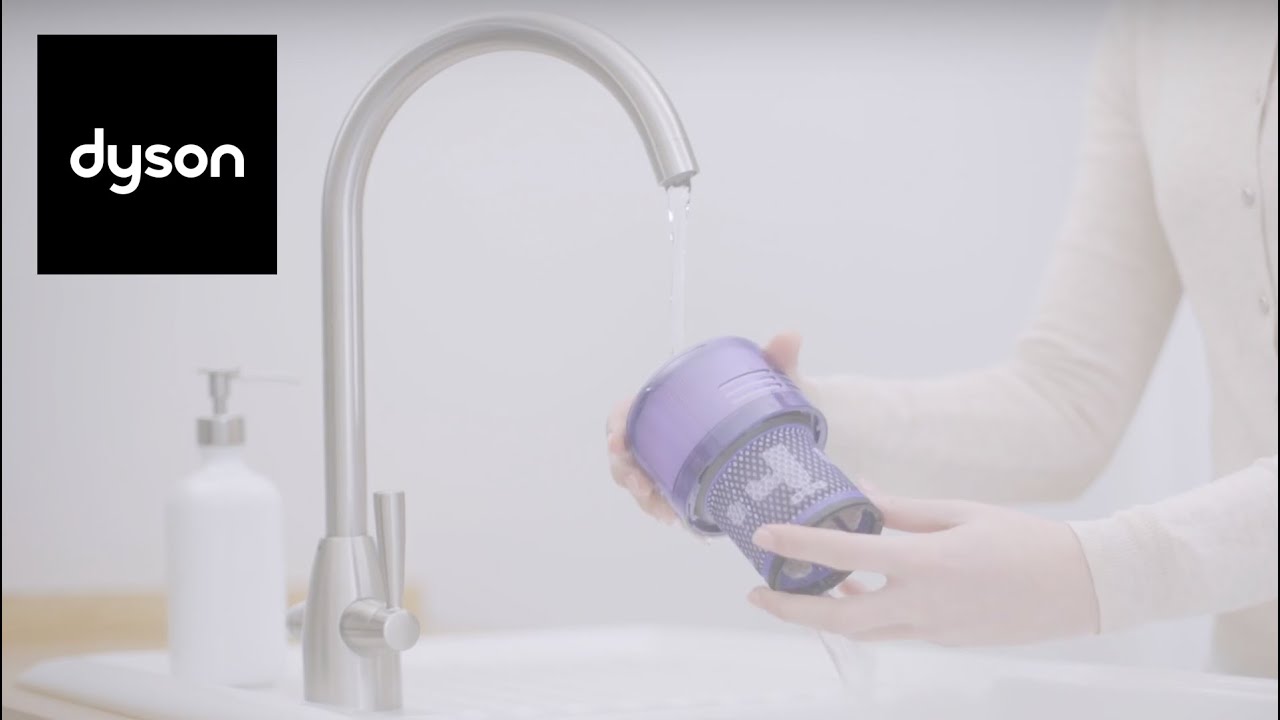
Clogged filters cause 40% of “Dyson V11 cordless vacuum not working” complaints that owners misdiagnose as motor failures. Many users wash filters but reinstall them damp, triggering mold growth that clogs airflow permanently.
The 24-Hour Drying Rule Most People Break
After washing your pre-motor filter under cold water, shake out excess moisture and place it vertically in a well-ventilated area. Never reinstall filters after just a few hours drying—residual moisture traps dust into concrete-like blockages. Test dryness by squeezing the filter firmly; if any water droplets appear, wait another 6 hours. For faster drying, place filters near (not on) a gentle heat source like a radiator.
Motor Protection Shutdowns: When to Worry
If your V11 powers on but cuts out after 2-3 seconds, thermal protection has activated—but this doesn’t always mean motor failure. Modern V11 models have sophisticated sensors that shut down for minor issues most owners can resolve.
Reset Motor Protection Without Tools
Remove all filters and blockages, then unplug the vacuum from any charger. Press and hold the power button for 20 seconds to drain residual power. Wait 10 minutes for internal components to cool completely, then attempt restart. If the vacuum runs normally, overheating caused the shutdown—not motor failure. This simple reset works in 7 of 10 cases where users think their motor has died.
Final Note: When your Dyson V11 cordless vacuum not working properly, systematic troubleshooting beats guesswork every time. Start with charging diagnostics, then eliminate blockages, verify filter condition, and finally assess battery health—this sequence solves 90% of V11 failures. Remember that genuine Dyson filters and batteries significantly outperform third-party alternatives, preventing recurring issues. For persistent problems after completing these steps, contact Dyson support with your error code details—many units still under warranty receive free component replacements. Regular monthly maintenance (emptying the bin, cleaning filters, checking for blockages) prevents 80% of these failures before they start, keeping your V11 running at peak performance for years.

